
Platform
How Focient works
One record, read five ways: live monitoring, plain-language questions, reports, memory and patterns, and cases. All five read the same analysed frames.
From camera to answer
Screens on this page show fictional data.
Works with the RTSP cameras you already run. No new hardware. A connection test runs before a camera is saved.
Frames are sampled from each camera. A detector screens them, and a vision model describes the ones that pass. Answers, alerts and reports read the descriptions.
Focient is a video intelligence platform. It is not a recording system, and it does not replace one.
A smart camera answers yes or no. Ask in plain language.
A smart camera
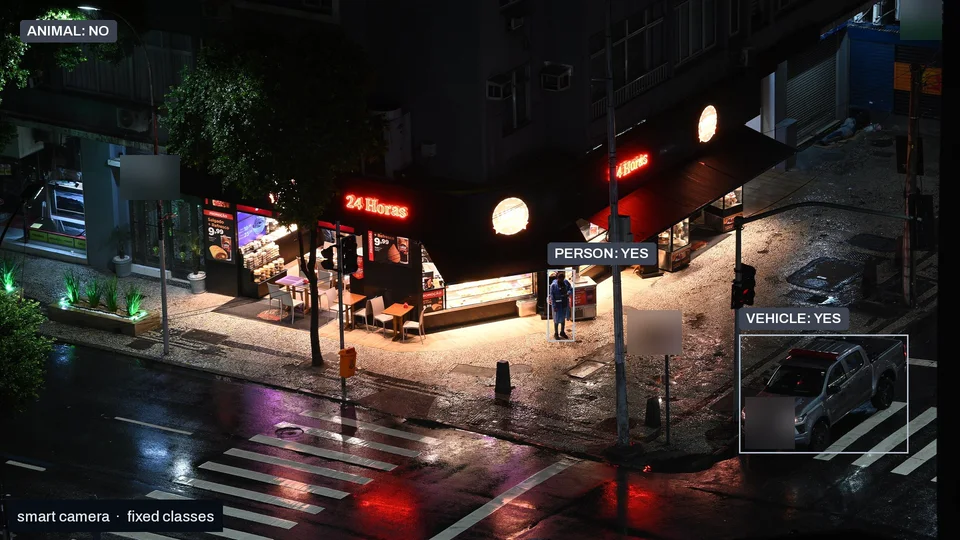
Person, vehicle, animal. It reports only the classes it was built for.
Focient, on the same camera
What we saw
A pickup is stopped at the corner with its lights on. One person stands near the crossing.
The vision model writes a description, tags and a significance score for each frame that reaches it. It does not choose from a fixed list of scenarios. What it describes is kept as an event, whether or not a rule is set.
Both panels show the same street corner at night: a pickup stopped at the crossing with its lights on, and one person standing near it. In the left panel a smart camera labels the scene Animal: no, Person: yes and Vehicle: yes, with the tag Smart camera · fixed classes. In the right panel Focient labels the pickup vehicle · #0746 and the person as person, on camera CAM 12 · CORNER, and says what it saw.
The labels are illustrative.
Live monitoring
The live dashboard shows your cameras, with the most significant recent events above them and a bar for asking a question below.
A detector screens every sampled frame. A vision model describes only the frames that pass.
Rules match on significance and tags, with an optional plain-language check against the event's description that fails closed before anyone is notified.
Name a zone, set a time-in-zone rule and a schedule. An alert needs both the measured duration and a frame check.
Rules are checked as each event from a live camera is recorded. A matching alert is sent at that point, not held for a later report.
Rules and labels describe what happened on camera.
Alerts
Alerts go out by email, WhatsApp or a signed webhook.
Operators mark each alert useful or not. Every rule keeps a quality score, and suggested rules wait for review.
Ask your cameras
Ask in plain language about what your cameras saw. Answers stream in with citation cards for the events and frames they rest on.
Describe what you are looking for in plain words and search events and frames for it.
Time phrases such as "last night" resolve in the organisation's time zone, or in UTC if none is set, and the answer says which zone it used.
Each answer shows the snapshot of the exact frame the vision model judged. The same snapshot appears in the event view and in the case timeline.
Matches are ranked by how closely they fit the question. A rank is not a probability, and no match is shown as a percentage.
Reports
A report is written once a day, automatically. It counts the day's events and alerts, shows activity by camera and the busiest hour, sums up highlights, patterns and anomalies, and lists the most significant events.
Reports can also be run on demand for any period up to 31 days.
Case briefings are drafted for an analyst to review and can be exported as Markdown.
Memory and patterns
Focient keeps a baseline for each camera by day of week and hour. Once a camera has enough history, deviations are flagged and repeats are grouped.
Cases
A timeline across cameras, annotations and a relationship map of what was seen together.